PPSA Lien Search Ontario: A Step-by-Step Guide
Check a vehicle before you buy
Enter a VIN for a free instant preview — accidents, title brands, mileage, liens & open recalls.
A PPSA lien search in Ontario is run through the province's PPSR portal at personalproperty.gov.on.ca using the VIN from the dashboard, costs $8.00 plus an extra $2.00 if you're not using a remote-access agreement, and gives you an on-screen result right away while a printed certificate is produced overnight for next-business-day pickup or mailing. If you're about to send an e-transfer, leave a deposit, or sign a bill of sale, that search is the checkpoint that tells you whether someone has registered a security interest against the vehicle before the deal closes.
That matters most when you're standing in a driveway, on a dealer lot, or at an auction lane and the seller says, “No liens.” Sometimes that's true. Sometimes they mean “I paid it off years ago.” Sometimes they don't know there's still an active registration. The Ontario registry won't tell you everything about the vehicle, but it is the official place to check whether a lien has been registered under the province's personal property system.
A lot of buyers mix up a lien check with a vehicle history report. They're not the same job. One is a registry search tied to legal security interests. The other is broader due diligence. If money is about to change hands, start with the registry search and treat it like part of closing, not a casual lookup.
Table of Contents
- Why an Ontario PPSA Lien Search Matters Before You Buy
- Getting the Right VIN and Choosing the Right Search Scope
- Running the Search in the Ontario PPSR Portal
- Reading Your PPSR Results the Right Way
- Where Ontario Buyers Get Burned by the Search
- PPSR Check vs a Full Vehicle History Report
- What to Do When a Lien Shows Up
Why an Ontario PPSA Lien Search Matters Before You Buy
You are standing beside the car, the seller has the ownership in hand, and the e-transfer screen is open. That is the moment a PPSA lien search matters.
Ontario's Personal Property Security Registration system is the official registry buyers use to check whether a security interest has been registered against a vehicle. The province's personal property services page explains that the system handles registrations and searches under Ontario's personal property and repair lien rules, including motor vehicle enquiries (Ontario personal property services).
Buyers get into trouble when they treat that search like casual research they can do whenever they get around to it. A lien search works best as a transaction checkpoint. Run it too early, use the wrong VIN, or skip it because the seller says the loan was paid off, and you are relying on assumptions at the exact point money is leaving your account.
I have seen clean-looking deals go sideways for simple reasons. The seller believed the lien was cleared. The buyer searched an old or mistyped VIN. The car looked fine, drove fine, and still had an active registration showing in the system.
Treat the search as part of payment, not part of browsing
The practical question is not whether the vehicle seems legitimate. The practical question is whether you have checked the registry right before release of funds.
That timing matters because the Ontario PPSR search answers a narrow but important question. It tells you whether a registration appears against the vehicle in the registry at the time you search. It does not inspect the car, confirm condition, explain every past event, or replace broader due diligence.
Ontario's PPSA has governed this area for years. For a buyer, the useful takeaway is simple. The registry search is the official check for registered security interests, and it belongs in the closing routine right before you pay.
What the official search does, and what it does not do
A PPSA search helps you check for registered lien risk. It does not give you the full story on accident history, branding, odometer issues, prior auction activity, or out-of-province history. That is where a broader vehicle history report can still earn its place.
Use both tools for different jobs. The PPSR check is the legal registry checkpoint tied to the transfer of funds. A history report fills in background the registry does not try to cover.
That distinction matters even more if the vehicle is headed to auction, export, or post-sale transport. Buyers sorting out paperwork and shipping often read beyond the lien issue, and the blog from Arete Global Shipping Services is a useful reference for that side of the transaction.
The buyer habit that prevents expensive mistakes
Before any deposit becomes non-refundable or the balance gets sent, do four things:
- Match the vehicle to the VIN on the car itself.
- Run the official Ontario registry search.
- Run it as close to payment as practical.
- Pause the deal if a registration appears and is not properly cleared.
That is how you check the transaction, not just the car.
Getting the Right VIN and Choosing the Right Search Scope
Most PPSR mistakes happen before the search even starts. Buyers focus on the fee and the form, but make-or-break step is copying the correct VIN and choosing the right search scope.
Ontario's official help page warns buyers not to rely on the VIN printed on the vehicle permit or ownership document. It says to copy the VIN from the vehicle itself, because the plate on the car, usually on the dashboard, is the number that should be searched (Ontario enquiry help).
Get the VIN from the dashboard first
Stand outside the driver's side and read the VIN through the lower windshield. That's your primary source. The ownership and door-jamb label can help you cross-check, but the dashboard VIN is the one Ontario tells you to use.
Why this matters is obvious once you've seen a bad entry come back “clean.” One wrong character doesn't always trigger a warning. It can return no relevant hit because you searched a different identifier.
Use this quick routine before you pay for anything:
- Photograph the dashboard VIN: A clear phone photo beats handwriting.
- Read it twice: Once visually, once character by character.
- Cross-check the seller's paperwork: You're confirming consistency, not treating the permit as the master record.
- Watch problem characters: B, 8, S, 5, Z, 2, and similar-looking characters cause plenty of bad searches.
Ontario PPSR search scopes compared
Ontario's motor vehicle search form asks you to choose a search scope. That choice affects what you see and how useful the result will be.
| Scope | What it returns | Best used when |
|---|---|---|
| Exact | Registrations matching the VIN exactly | You have a clearly confirmed VIN and want the cleanest direct match |
| Exact & Similar | Exact VIN results plus near-matches | You want a wider net in case of clerical entry issues |
| Condensed | Only current registrations, not expired ones | You only care about active registrations and want a narrower current snapshot |
For buyers who haven't used the registry before, this guide on how to check for a lien on a car is a helpful companion because it frames the lien check in plain buying terms rather than legal jargon.
A clean result is only meaningful if the search input was right. Garbage in still gives you an official-looking certificate.
Which scope makes sense in real life
Exact is the default when the VIN is confirmed and you want a direct answer.
Exact & Similar is useful when you're dealing with older paperwork, prior clerical handling, or a situation where you don't fully trust prior records. It's the more cautious choice.
Condensed is narrower. If your concern is whether there's a current active registration at closing, it can be practical. If you want more context around prior registrations and expired entries, it's less informative.
The trade-off is simple. Tighter search, less noise. Broader search, more review.
Running the Search in the Ontario PPSR Portal
You do this search right before money changes hands, not two days earlier from your kitchen table. If I'm standing with a buyer looking at a used car in Ontario, I want the VIN already confirmed, the seller beside us, and the PPSR result pulled as close to payment as possible. That is the point of the registry check. It is a transaction checkpoint.
The click path that works
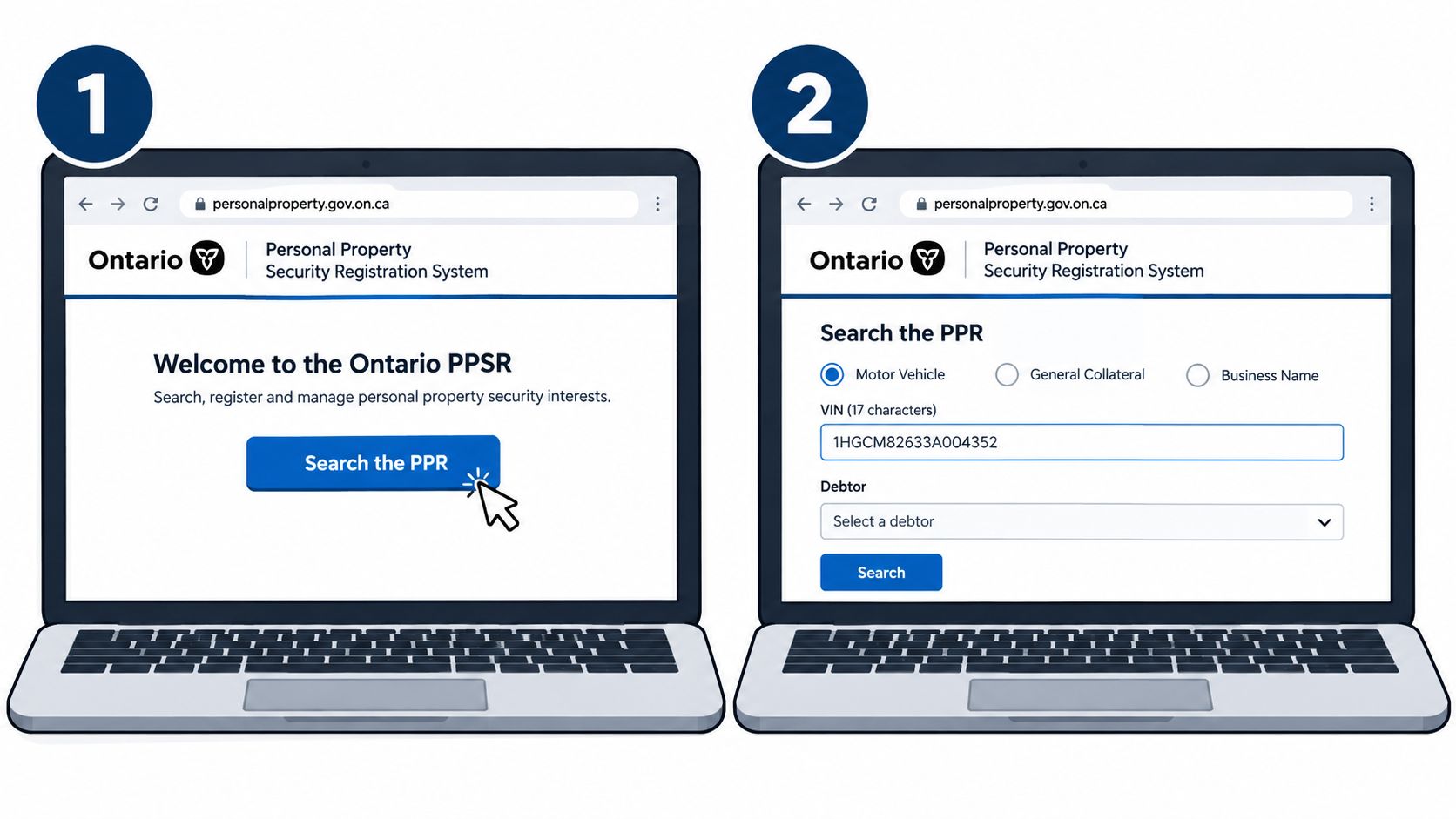
Open the Ontario PPSR portal and select Search the PPR. Then choose Motor Vehicle. Enter the VIN, choose your search scope, and run it.
Do your prep before you log in:
- The full VIN, copied directly from the vehicle
- Seller details you can compare against the result
- Your chosen scope, already decided
- A payment method
Ontario's motor vehicle enquiry help explains the search flow and the form options. You'll be choosing among Exact, Exact & Similar, or Condensed, and then selecting the sub-search setting that fits what you want returned.
The practical mistake is waiting until you are on the payment screen to decide how cautious you want to be. Make that call first, then run the search once, cleanly.
What to expect from the portal
The system gives you an on-screen result right away. For a live deal, that is the result that matters first because it lets you stop, question the seller, or proceed before funds are sent. Keep a screenshot or save the output immediately.
There is also a formal record available afterward through the normal ministry process. Keep that too. If the deal goes sideways later, you want proof of what you searched, when you searched it, and what the registry returned at that moment.
That timestamp matters.
A PPSR search done yesterday is already stale if payment happens today. Liens can be registered between your early check and the actual handoff of money. Run it as late as you reasonably can, ideally while the deal is being finalized.
Fees and timing
Ontario publishes the search fee under its fee regulation, and one-off buyers usually care about the standard pay-per-search cost rather than remote access account pricing. Budget for the search and treat it like part of closing the deal, same as verifying ID or matching the ownership.
ServiceOntario's Access Now page also sets out the service hours for PPSR access. Check those hours before you book a late-evening meetup with a seller. If you cannot run the search when payment is about to happen, you are guessing at the risk.
Small habits that prevent bad misses
The portal itself is simple. The trouble starts when buyers rush it in a driveway or parking lot.
- Paste the VIN. Do not type it from memory or from a blurry photo.
- Run the search near payment time. Early checks are weaker checks.
- Save the live result. A screenshot is fast and useful.
- Keep the formal output too. It is part of your paper trail.
- Remember what the registry does not do. It can show registered security interests tied to the search you ran. It does not replace a broader vehicle history check for collisions, branding issues, odometer concerns, out-of-province events, or other facts buyers care about.
That last point is where buyers get overconfident. A clean PPSR result can still sit beside a bad vehicle story. The registry answers a narrow question. Use it at the moment funds are about to move, then decide whether the rest of the car's history also supports going ahead.
Reading Your PPSR Results the Right Way
The PPSR result isn't hard to read once you know what matters. What trips buyers up is assuming “a result” equals “a problem” or “no result” equals “safe.” You need to read the certificate like a deal file.
Start with the search snapshot
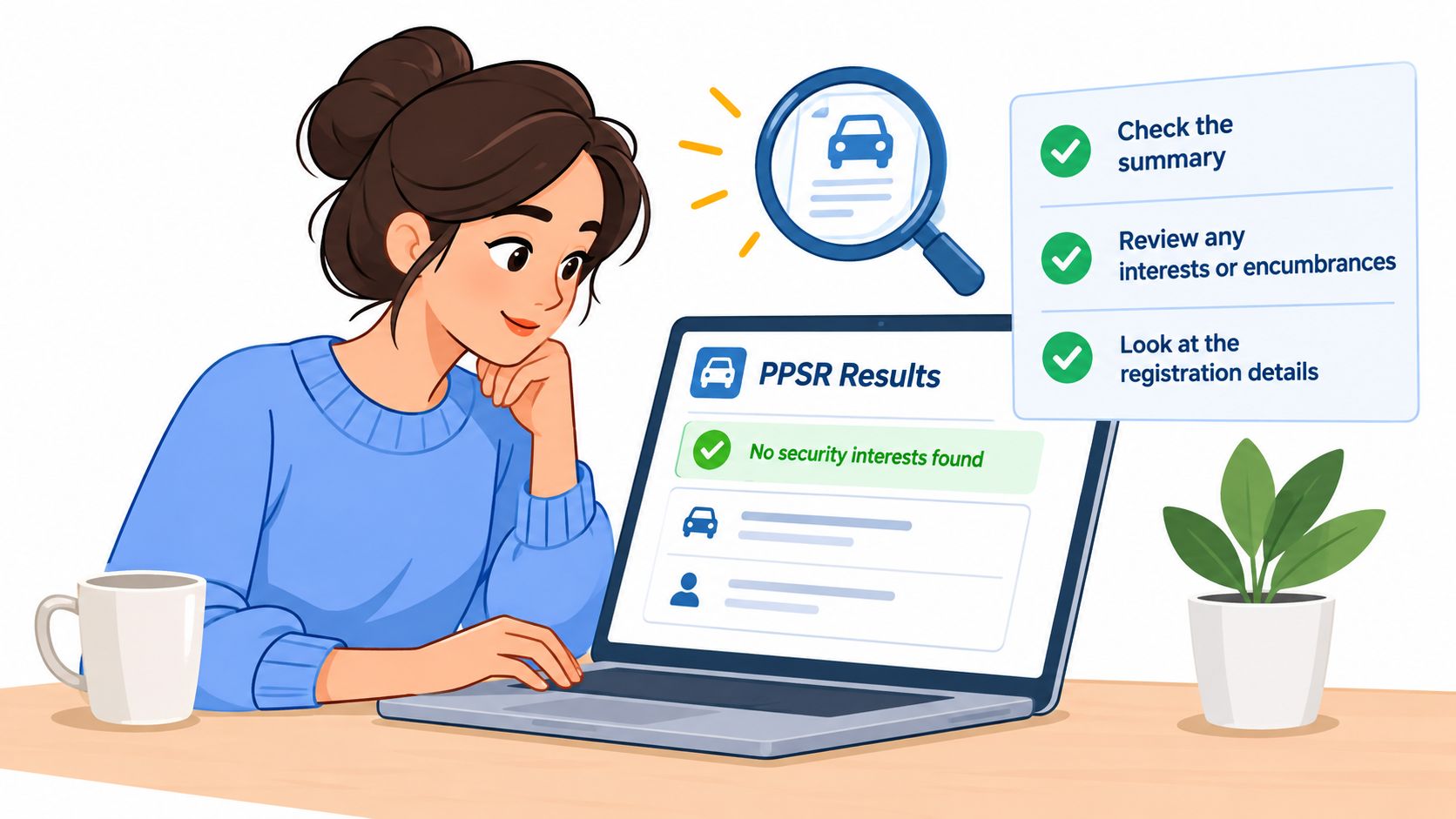
The first thing I look at is the top of the result. Confirm the search type, the search criteria, and the moment the search was run. A lien search is only as fresh as its timestamp.
If the buyer searched yesterday and wants to pay today, I treat that as old information. The closer the timestamp is to the transfer of funds, the better.
Check the certificate as if you're checking a work order. Wrong unit number, wrong job. Wrong VIN, wrong answer.
Read the registration details carefully
Look at the registration block next. You're trying to answer three questions:
- Is the registration active or discharged
- Who is the debtor
- How is the collateral described
Registration and expiry dates matter because they tell you whether the filing is current or historical. A current registration is an active issue until it's properly dealt with. An expired record can still tell you the vehicle had prior secured debt, which may help you ask better questions, but your immediate concern is whether there's an active encumbrance at closing.
The collateral description is where people get lazy. If the registration names the VIN tightly, that usually points to a straightforward vehicle-specific security interest. If the wording is broader, such as a general claim over wider classes of personal property, slow down and read every line.
Match the people, not just the car
The debtor block matters as much as the vehicle details. Does the registered debtor match the seller standing in front of you? If not, don't paper over that mismatch.
A private seller saying “it was my company's car” or “it's in my spouse's name” may have a perfectly explainable story. It may also mean you're dealing with someone who doesn't have clean authority to transfer the vehicle free of encumbrance.
Review the secured party block too. That's the lender or finance party you'd contact for a payout statement, discharge confirmation, or no-interest letter if the deal is going to continue.
What to watch for in the wording
Use this short reading checklist:
- Search header: Confirm the VIN and search type match what you intended.
- Debtor section: Make sure the legal name aligns with the seller or registered owner.
- Secured party section: Identify who must confirm payoff or discharge.
- Collateral wording: Tight VIN-specific wording is easier to assess than broad asset language.
- Status cues: Distinguish active registrations from discharged ones.
The safest buyers don't just ask, “Did something show up?” They ask, “What exactly showed up, for whom, and does it still affect this deal?”
Where Ontario Buyers Get Burned by the Search
You run the PPSR search at lunch, hand over the money after work, and assume the clean result still protects you. That gap is where buyers get hurt.
The registry is only as good as the details you enter and the moment you run it. As the Ontario motor vehicle enquiry help notes, the user is responsible for the accuracy of the search request. In plain language, a clean result on the wrong VIN, or a clean result from too early in the day, can still leave you with a problem when the deal closes.
The common failure modes
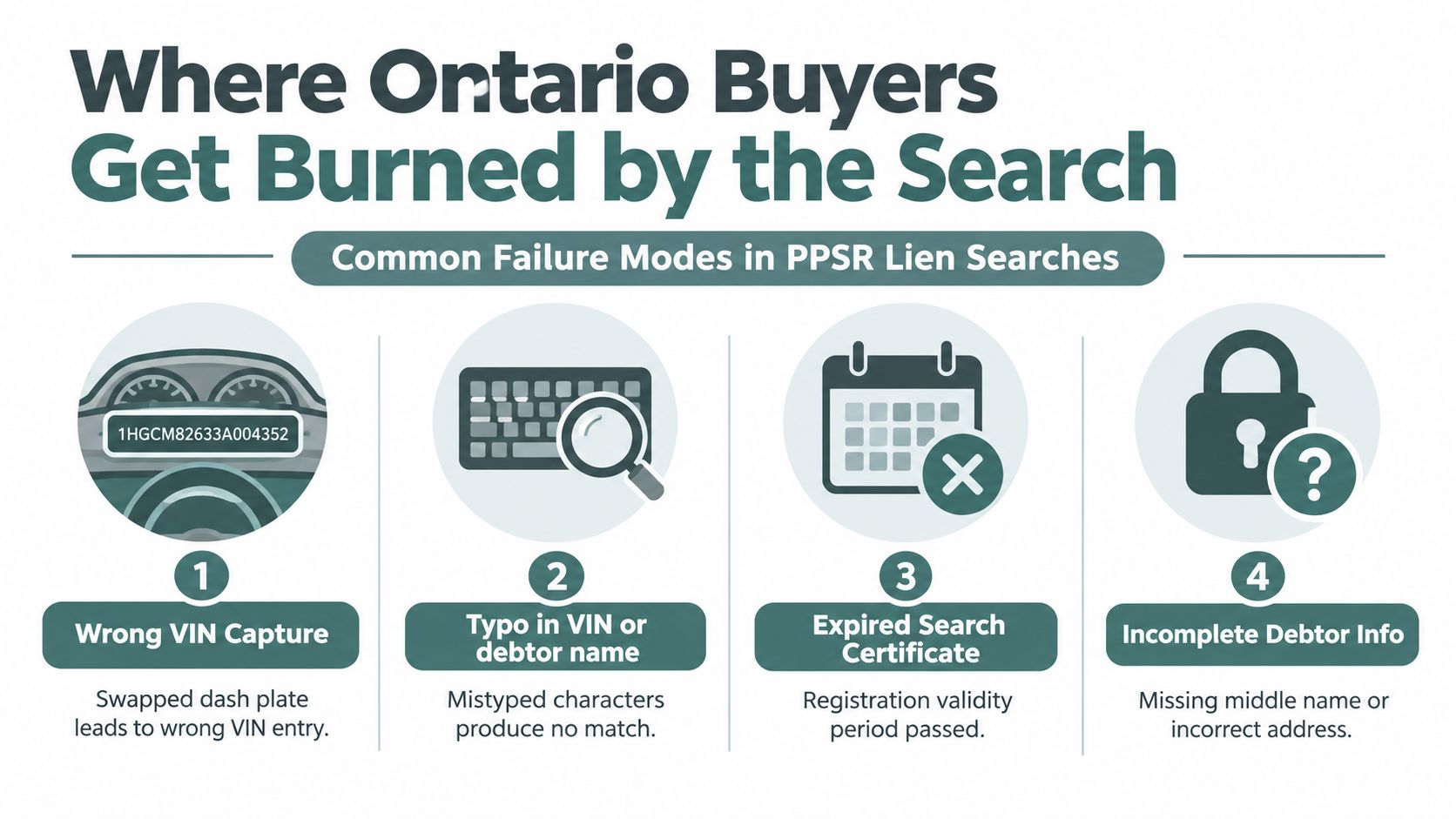
Ontario buyers usually get burned in five predictable ways.
- They pull the VIN from the wrong place. A seller screenshot, old insurance slip, or typed ad copy is not good enough. Read the VIN off the vehicle itself, then match it to the ownership and bill of sale.
- They treat the search like early research instead of a closing checkpoint. A search from yesterday helps you ask questions. It does not answer the lien question at the moment money changes hands.
- They stop at “no exact hit” without checking the deal story. If the seller says the car belongs to a company, a parent, or an ex-spouse, the paperwork needs to line up. If it does not, slow the deal down.
- They assume every registration will read like a simple car loan. Some filings are easy to read. Others use broader collateral wording, and that is where rushed buyers miss what they are looking at.
- They accept promises instead of payoff proof. “I'll clear it after you pay me” is not a plan. A payout statement, discharge, or written confirmation from the secured party is.
Name errors cause problems in registry searching generally, and the same practical rule applies here. If the ownership story is messy, do not rely on a clean-looking vehicle result alone. Match the seller's ID, the registered owner, and any signing authority before you release funds.
What works better at the curb
Use a simple closing routine.
Check the VIN on the dash or door sticker yourself. Run the PPSR search as close to payment as you can. If anything appears, or if the seller story does not match the paperwork, pause the transaction until you have lender documents in hand.
That is the trade-off. The Ontario PPSR is the official checkpoint for registered security interests tied to the deal, but it does not tell you everything about the vehicle's past. It will not explain damage history, odometer concerns, salvage context, or why a seller's story feels off. That broader context is where a full history report earns its keep.
Buyers rarely get into trouble because the registry failed. Trouble starts when they use the registry at the wrong moment, with the wrong identifier, or without testing whether the paperwork and the seller match.
PPSR Check vs a Full Vehicle History Report
A PPSR search and a full vehicle history report answer different questions. If you use one expecting the other, you end up with blind spots.
Ontario PPSR vs Full Vehicle History Report
| Coverage area | Ontario PPSR | Full vehicle history report |
|---|---|---|
| Registered security interest in Ontario | Yes. This is the official purpose of the search | May include lien-related information, but it is not the Ontario registry itself |
| Transaction timing | Best used right before money changes hands | Useful before buying, bidding, trading, or importing |
| Accident and damage context | No | Often included when available |
| Odometer history | No | Often included when available |
| Title brands and salvage context | Not the purpose of the PPSR search | Often included when available |
| Auction records and prior listing clues | No | May be included when available |
| Cross-jurisdiction context | Limited to the registry search purpose | Can pull broader records across jurisdictions |
Ontario's PPSR system is authoritative for one core question. Has someone registered a security interest that affects this vehicle transaction in Ontario? That's why it's cheap, direct, and tied to closing.
A commercial history report is the broader second layer. It helps when you're dealing with a salvage unit, a high-kilometre trade, a cross-border import, or a vehicle with gaps in its paper trail. If you want a fuller picture of what those reports can add, this overview of a vehicle history report in Canada lays out the difference well.
When each one earns its keep
A simple private-party Ontario deal with a matching VIN, consistent seller paperwork, and a straightforward title story still benefits from the official PPSR search because lien risk is a transaction problem.
A broader history report earns its keep when the vehicle's past needs context, for example:
- Auction or salvage interest: You want branding and sale-history clues.
- Cross-border background: You need U.S. and interprovincial context.
- Mileage suspicion: You want odometer chronology when available.
- Accident uncertainty: You need more than the seller's version.
This is also the one place where a tool like Vektracer can fit. It compiles VIN-based records into a structured vehicle history report that can include accident context, title brands, odometer history, auction records, ownership history, theft checks, and recall lookups when available. That's different from the Ontario PPSR registry search, not a replacement for it.
The practical buying order
If I'm buying smart, I stack the checks in this order:
- Official PPSR search for lien risk at closing
- Commercial history report for broader past-use and damage context
- Mechanical inspection for condition
None of those replaces the others. They each cover a different kind of mistake.
What to Do When a Lien Shows Up
If your PPSA lien search in Ontario shows an active registration, stop the deal where it stands. Don't send the deposit “to hold it.” Don't sign first and sort it out later. Don't assume the seller's word fixes the record.
The first decisions to make
Start with identity. Does the debtor named in the registration match the seller?
If the answer is no, the transaction gets much harder to trust. At minimum, you need a clean explanation and written proof tying the seller to the registered debtor and the vehicle. If the answer is yes, move to payoff and discharge.
Ask for:
- A payout statement: Showing what must be paid to clear the debt
- A discharge or no-interest confirmation path: So you know what document should follow
- Lender contact information you verify independently: Don't rely only on a phone number handed over by the seller
Your practical options
You usually have three sensible paths.
First, pay the lender directly as part of the deal and wait for the registration to be discharged before releasing the rest of the funds.
Second, if the lender and transaction structure support it, work from written lender instructions that clearly set out how the security interest will be dealt with during the sale.
Third, walk away if the seller resists transparency, won't provide lender paperwork, or keeps changing the story.
If a seller gets defensive when you ask for a payout statement, that's useful information. A clean seller wants the lien issue cleared too.
Re-check before final payment
Even after a seller says the lien has been paid, don't assume the record is already clean. Re-run the search before final release of funds. If you want a practical follow-up on that step, this guide on how to check if a lien was released is worth keeping open beside the deal file.
The point isn't to be difficult. It's to finish the transaction with proof instead of hope.
If you've already run the Ontario PPSR search and want the rest of the story on the vehicle, Vektracer gives you a VIN-based history view that can add accident records, title brands, odometer readings, auction activity, theft checks, and ownership context when available. Use the PPSR search to clear the lien question, then enter the VIN or license plate in Vektracer if you want a broader picture before you buy.
Ready to check a vehicle?
Enter any 17-character VIN for a free instant preview — no account needed.